

The best journaling software is the one you will open every day, and for most people that means a simple writing app with strong privacy, easy search and reliable backups. Day One, Journey, Penzu, Diaro, Notion, Obsidian and Apple Journal each suit a different kind of writer, so the right pick depends on how you write, where you write and how private you need your entries to be.
This guide compares eight popular options in plain language, explains the features that actually matter, and gives you a simple process to choose one without wasting weeks on app-hopping. If you are brand new to the idea, our guide to online journaling is a good companion read.
What Is Journaling Software?
Journaling software is any digital tool built for regular personal writing: a dedicated journaling app, a desktop program, a web-based diary, or a general notes tool that you set up as a journal. The point is the same as a paper notebook, which is to capture thoughts, memories and reflections, but with extras such as search, reminders, photo attachments, tags and backups.
Some people use the word “diary software” for the same thing. If you like that term, you may also enjoy our overview of the electronic diary, which looks at the wider idea of keeping a diary on screen.
Journaling Software vs Journaling Apps vs Notes Apps
The labels overlap, but the differences help when you shop:
- Journaling apps are built around one entry per day, a calendar view and prompts. They feel like a diary.
- Journaling software for desktop usually offers a larger writing space, export options and local file storage.
- Notes apps are flexible workspaces. They can become a journal, but you must build the habit and structure yourself.
Who Needs Journaling Software?
Almost anyone who writes regularly can benefit. A student may want a simple place to record daily reflections. A professional may want a log of wins and lessons. A traveller may want photos tied to places. A person writing about private feelings may care most about encryption and a passcode lock.
Typical use cases include:
- Daily diary writing and memory keeping
- Gratitude, mood and wellness tracking
- Work logs and career reflection
- Travel and pregnancy journals
- Creative writing and idea capture
Key Features to Look For
Feature lists can be overwhelming, so focus on the few that change your daily experience. These are the criteria we use to compare the tools below.
Privacy and Security
Your journal may contain the most personal things you write. Look for a passcode or biometric lock, clear statements about whether entries are encrypted, and an honest explanation of who can read your data. End-to-end encryption means the company itself cannot read your entries, which is the strongest option, while standard encryption protects data in transit and on servers. Always read the current privacy policy of a tool before you commit.
Sync and Platform Support
Decide where you write. If you use a phone, a laptop and a tablet, you want sync that works across all of them. If you only write on one device, local storage may be perfectly fine and even more private.
Search, Tags and Organisation
A journal becomes more useful the longer you keep it. Fast search, tags, folders and a calendar view let you find that entry from two years ago in seconds.
Export and Backup
Never lock your memories inside one app. Good software lets you export entries to PDF, text, Markdown or another open format. This is also your insurance if a company changes its pricing or closes.
Prompts, Reminders and Habit Support
Writing prompts help on days you do not know what to say, and reminders help you build consistency. If habit building is your main goal, read our walkthrough on how to build a daily journaling habit in four weeks before choosing a tool.
Media and Formatting
Photos, voice notes, location, weather and rich text add context. They matter most to travellers and memory keepers. Minimalists may prefer a clean text box with nothing else.
Cost
Many journaling tools have a free tier and a paid plan. Prices change often, so check each product’s own pricing page before subscribing, and test the free version for at least a week.
Best Journaling Software Compared
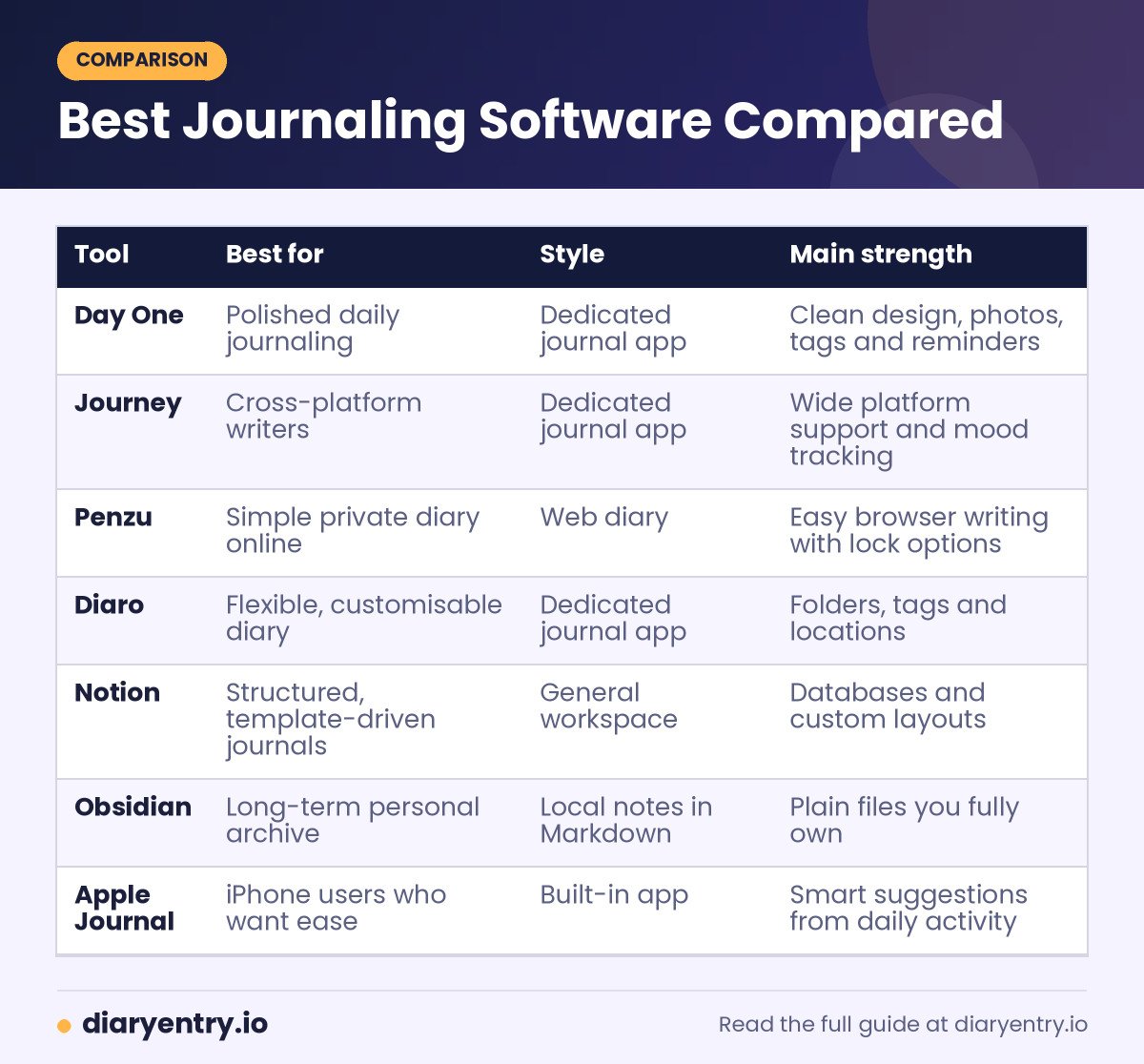
The table below summarises how the eight tools differ in focus. Features and plans change, so treat it as a starting point and confirm details on each official site.
| Tool | Best for | Style | Main strength |
|---|---|---|---|
| Day One | Polished daily journaling | Dedicated journal app | Clean design, photos, tags and reminders |
| Journey | Cross-platform writers | Dedicated journal app | Wide platform support and mood tracking |
| Penzu | Simple private diary online | Web diary | Easy browser writing with lock options |
| Diaro | Flexible, customisable diary | Dedicated journal app | Folders, tags and locations |
| Notion | Structured, template-driven journals | General workspace | Databases and custom layouts |
| Obsidian | Long-term personal archive | Local notes in Markdown | Plain files you fully own |
| Apple Journal | iPhone users who want ease | Built-in app | Smart suggestions from daily activity |
| Google Docs | Free, familiar option | Document editor | Zero setup and easy sharing |
1. Day One
Day One is often the first name people hear in this category. It is built around the simple idea of one journal with entries by date, and it supports photos, tags, places and reminders. Its main appeal is a calm, polished writing experience that makes daily entries feel effortless.
Best for: people who want a dedicated, attractive journal and are happy to pay for a premium experience.
Things to check: the free features and subscription plan, and how the app handles export so you are never locked in.
2. Journey
Journey is a cross-platform journaling app that aims to work on whatever devices you own. It combines a clean editor with mood tracking, media attachments and an activity view of your writing. If you switch between different operating systems, a tool that supports all of them removes a lot of friction.
Best for: writers who use a mix of phone, tablet and computer platforms.
Things to check: which features sit behind the paid plan, and which privacy options are available for your account.
3. Penzu
Penzu is a simple online diary that works in a browser, which makes it handy when you do not want to install anything. It focuses on private writing with lock options, and it feels close to a traditional diary. This is a practical choice for beginners who want to start in five minutes.
Best for: beginners and anyone who prefers a plain web-based diary.
Things to check: the differences between free and paid levels, particularly around security features.
4. Diaro
Diaro is a flexible diary app that lets you organise entries with folders, tags and locations. It suits people who like to customise how their journal is structured, and who want a more traditional diary feel with a bit of added organisation.
Best for: people who want structure without a steep learning curve.
Things to check: sync options between devices and how backups are handled.
5. Notion
Notion is a general workspace, not a journaling product, but its templates and databases make it a strong journal for people who like systems. You can build a daily page, a weekly review, a mood table and a gratitude list in one place. The trade-off is that you must design the system yourself, and a complicated setup can become a reason to avoid writing.
Best for: planners, students and professionals who already live in Notion.
Things to check: privacy settings, and whether you are comfortable keeping deeply personal writing in a cloud workspace.
6. Obsidian
Obsidian stores your notes as plain Markdown files on your own device. That means you own your journal completely, and you can open it with almost any text editor in the future. It is excellent for long-term archives and for linking ideas together, though it takes some setup and is less friendly to beginners.
Best for: people who value ownership, longevity and control over polish.
Things to check: how you will sync between devices, since that is something you configure rather than something built in.
7. Apple Journal
Apple Journal is a built-in app on supported iPhones. It suggests moments to write about using your photos, places and activity, which lowers the barrier to starting. It is convenient for people already inside the Apple ecosystem, though it is not designed for every platform.
Best for: iPhone users who want the lowest-friction start.
Things to check: device and software requirements, and how you can export entries if you ever leave the platform.
8. Google Docs
A simple document can be a perfectly good journal. Google Docs is free to start, familiar to almost everyone and available in any browser. You can keep one document per month or per year and use headings for dates. It lacks reminders and mood features, but the lack of friction is a real advantage.
Best for: anyone who wants zero setup and a familiar interface.
Things to check: that you use a strong password and sensible sharing settings, because a document is easy to share by accident.
Best Journaling Software by Use Case
Different goals call for different tools. Here is a quick way to narrow your list.
Best for Beginners
Choose a simple option such as Penzu, Day One or Apple Journal. Starting with a tool that has few settings keeps your attention on writing instead of configuring.
Best for Privacy
Local-first tools such as Obsidian give you the most control, because your files stay on your device. If you prefer a cloud service, look for an app lock and a clear encryption statement, then read the privacy policy carefully.
Best for Students
Students often want something free, quick and organised by date. A simple diary app or a document works well. Our guide on diary prompts for students gives plenty of ideas for what to write once you pick a tool.
Best for Work and Productivity
A work log needs fast entry, search and tags. Notion and Obsidian are strong options, and a plain document also works. See our work diary guide for a template you can copy into any of these tools.
Best for Travel
Travellers value photos, maps and offline access. A dedicated travel tool will serve you better than a general notes app, and our comparison of the best travel journal apps covers that niche in detail.
Best Free Option
Google Docs, the free tiers of dedicated apps, and open-source Markdown tools let you start without paying. Free is a great way to test your habit before you invest in a subscription.
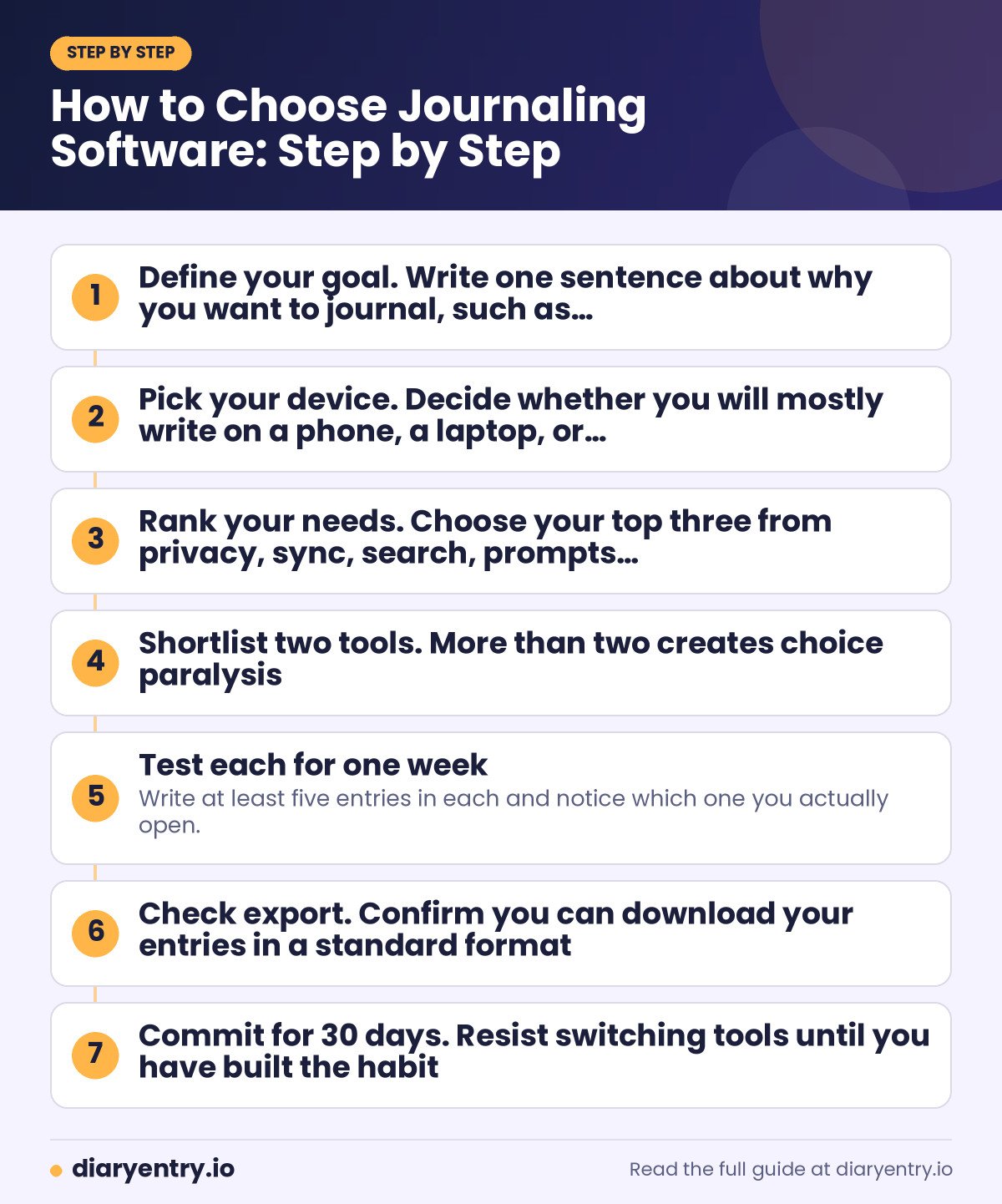
How to Choose Journaling Software: Step by Step
Use this short process to decide in an afternoon instead of a month.
- Define your goal. Write one sentence about why you want to journal, such as “reflect after work” or “record family memories”.
- Pick your device. Decide whether you will mostly write on a phone, a laptop, or both.
- Rank your needs. Choose your top three from privacy, sync, search, prompts, media and price.
- Shortlist two tools. More than two creates choice paralysis.
- Test each for one week. Write at least five entries in each and notice which one you actually open.
- Check export. Confirm you can download your entries in a standard format.
- Commit for 30 days. Resist switching tools until you have built the habit.
Common Mistakes When Choosing a Journaling Tool
Even thoughtful people stumble in the same few ways. Avoiding these will save time and frustration.
- Choosing by features instead of feel. The tool with the longest feature list is rarely the one you enjoy using.
- Ignoring export. If you cannot leave, you do not truly own your journal.
- Over-building a system. Elaborate templates look impressive but often collapse after two weeks.
- Skipping privacy checks. Read what the company says about encryption and data access.
- Switching too often. Moving your journal every month interrupts the habit that gives journaling its value.
Digital Journal vs Paper Journal
Software is not the only choice. A paper journal feels slower and more personal, and it cannot be hacked or lose sync. Digital tools win on search, backup, convenience and the ability to add photos. Many people use both, writing quick entries on a phone and longer reflections in a notebook.
If you are not sure which style suits you, our guide to types of journals explains the main formats so you can match the tool to the kind of writing you want to do.
Sample Entry: What to Write on Day One
A tool is only useful once you start. Here is a gentle first entry you can copy into any app.
- Date and time: write today’s date and how you feel in one word.
- Three facts: what happened today, in plain sentences.
- One highlight: the best moment of the day and why it stood out.
- One lesson: something you would like to remember next time.
- One intention: a small action for tomorrow.
Five short lines are enough. Consistency matters more than length, and you can always add more detail later.
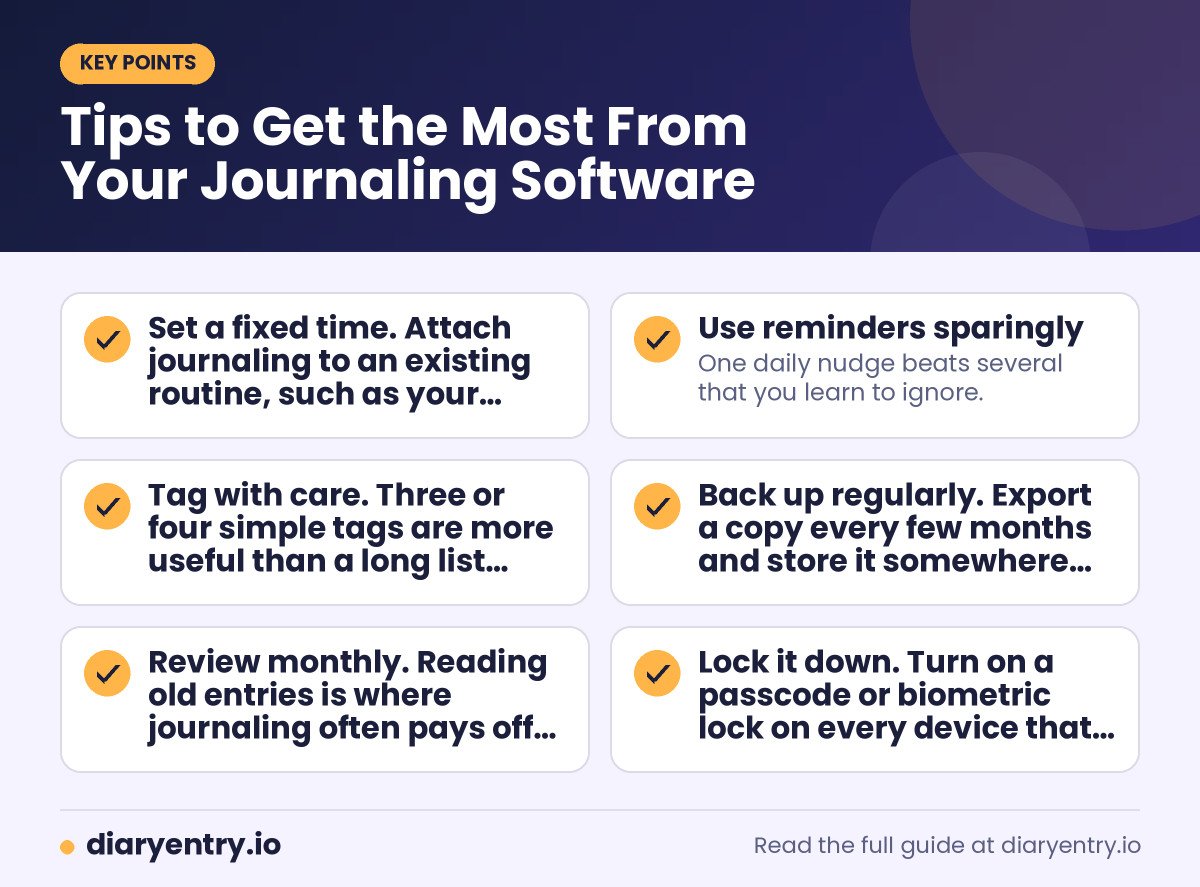
Tips to Get the Most From Your Journaling Software
- Set a fixed time. Attach journaling to an existing routine, such as your morning coffee or the end of your commute.
- Use reminders sparingly. One daily nudge beats several that you learn to ignore.
- Tag with care. Three or four simple tags are more useful than a long list you never maintain.
- Back up regularly. Export a copy every few months and store it somewhere safe.
- Review monthly. Reading old entries is where journaling often pays off the most.
- Lock it down. Turn on a passcode or biometric lock on every device that holds your journal.
Frequently Asked Questions
What is the best journaling software?
There is no single winner. Day One, Journey and Penzu are popular for dedicated journaling, Notion and Obsidian suit people who like to build systems, and Apple Journal or Google Docs are easy starting points. Pick the tool you will use daily.
Is there free journaling software?
Yes. Google Docs, the free tiers of several journaling apps, and open-source Markdown editors all let you start without paying. Check the current limits of each free plan before relying on it.
Which journaling software is the most private?
Local-first tools that keep files on your own device give you the most control. For cloud tools, look for an app lock, a clear encryption statement and a readable privacy policy.
Can I use Word or Google Docs as a journal?
Absolutely. A single document with dated headings works well for many people. You lose reminders and mood tracking, but you gain simplicity and a format you already know.
How do I keep a journal consistent?
Choose one tool, set a small daily target such as five lines, and attach writing to an existing habit. A structured programme can help too, such as the 4-Week Diary Entry Course on this site.
Can I move my entries to another app later?
Usually yes, if the software supports export. Before you commit, confirm that you can download your entries in PDF, text or Markdown.
Is a journaling app better than a paper journal?
Neither is better for everyone. Apps offer search, backup and photos, while paper offers focus and a screen-free ritual. Many people combine the two.
Conclusion: Choose the Best Journaling Software for Your Habit
The best journaling software is not the one with the most features, but the one that fits your routine, protects your privacy and lets you export your words whenever you like. Shortlist two tools, test each for a week, and commit to one for 30 days.
If you want guidance beyond the tool itself, the 4-Week Diary Entry Course walks you through building a daily writing habit step by step, whichever app or notebook you choose.